
Speakers

Types of Computer Speakers: Definition, Function and How They Work

Secure IT Asset Disposition Service

Dispose of outdated IT equipment securely and sustainably with our convenient, free IT asset pickup, complete data destruction, and eco-friendly recycling services.

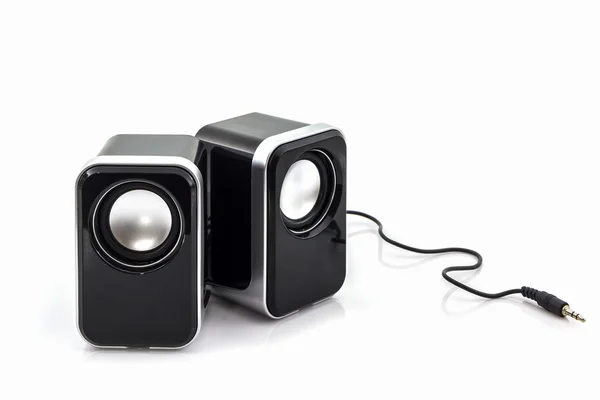
Computer speakers are a type of IT asset that function as output devices for computer systems, allowing users to hear the sound produced by the machine. They are important hardware peripherals that play a key role in delivering audio for music, videos, games, calls, and other multimedia activities. Depending on the model, they can connect to a computer through interfaces such as a 3.5mm audio jack, USB, or wireless technologies like Bluetooth.

These devices help improve the overall user experience by adding clear and reliable sound output to a computer setup. As part of the broader hardware environment, computer speakers work alongside internal components such as the CPU, RAM, and storage drives to support multimedia performance. Many well-known brands, including Klipsch, Logitech, Creative, SteelSeries, Razer, and Pioneer DJ, offer different speaker systems designed for a variety of listening preferences, room sizes, and performance needs.

How do computer speakers work?

Computer speakers work by receiving electrical audio signals from the computer through either a wired or wireless connection. Once the signals reach the speaker system, they are converted into sound waves that can be heard by the user. This process happens through internal speaker drivers made up of components such as diaphragms, voice coils, magnets, and cones, all of which vibrate in response to the incoming signals.

The audio signals sent to the speakers are usually processed by the computer’s sound card. In many systems, the sound card uses a digital-to-analog converter (DAC) to turn digital audio data into analog signals that speakers can reproduce as sound. The built-in amplifier inside the speaker, or an external one in some setups, boosts the signal so that the audio is loud enough and clear enough for listening.

What are the types of computer speakers?

The types of computer speakers are as follows:

  1. Active Speakers: Active speakers are speakers with built-in amplifiers, meaning they do not need a separate external amplifier to function. They are often designed in a bookshelf style and provide an all-in-one audio solution that is convenient for everyday computer use.

  2. 2.1 Speakers & Subwoofer: This speaker setup includes two main speakers for handling mid-range and high-frequency sounds, along with a dedicated subwoofer for bass. It is a popular option for users who want stronger low-end sound for music, movies, and games.

  3. Soundbars: Soundbars are slim, elongated speakers that are usually placed below or in front of a monitor. They are designed to save space while still offering broader and more room-filling sound than standard compact desktop speakers.

  4. Stereo PC Speaker System: A stereo PC speaker system generally includes two full-range speakers that deliver left and right audio channels. This is one of the most common and straightforward speaker setups for everyday listening and basic computer audio needs.

  5. 5.1 PC Speaker System: A 5.1 speaker system typically includes front speakers, rear speakers, a center speaker, and a subwoofer. This arrangement creates surround sound, making it ideal for gaming, movies, and other uses where a more immersive audio experience is preferred.

  6. Wireless PC Speakers: Wireless PC speakers connect to the computer using technologies such as Bluetooth or Wi-Fi instead of physical cables. They offer a cleaner setup, more flexibility in placement, and greater convenience for users who want to reduce desk clutter.

  7. Compact Bookshelf Speakers: Compact bookshelf speakers are small speakers made to fit easily on desks, shelves, or limited workspaces. Even with their smaller size, they can still provide strong audio performance and are often chosen for balanced sound in smaller environments.

  8. Multimedia Speakers: Multimedia speakers are versatile audio devices that can be used not only with computers but also with smartphones, tablets, and other media players. Their flexibility makes them a practical choice for users who want one speaker system for multiple devices.

  9. Gaming Speakers: Gaming speakers are designed with gamers in mind and often include features such as enhanced bass, more immersive sound output, and sometimes customizable lighting effects. They are intended to create a more engaging experience during gameplay.

  10. Portable Speakers: Portable speakers are compact, lightweight, and often battery-powered, making them easy to carry and use with laptops or mobile devices. They are useful for users who need audio on the go or want a speaker that can be moved easily between locations.

What are the criteria to rate computer speakers?

The criteria used to rate computer speakers are listed below:

  • Sound Quality: Sound quality is one of the most important factors when evaluating computer speakers. It includes clarity, balance, depth, and accuracy of audio reproduction. A good speaker should deliver clear highs, detailed mids, and well-defined bass. Frequency response, typically measured from 20Hz to 20kHz, is also important because it indicates how much of the human hearing range the speakers can reproduce.
  • Power Output: Power output, usually measured in watts (W), determines how loud the speakers can play without distortion. Higher wattage generally allows for greater volume, but it should be balanced with sound quality to avoid distortion or loss of clarity at higher levels.
  • Impedance: Impedance, measured in ohms (Ω), refers to the electrical resistance within the speaker system. Proper impedance matching between the speakers and the audio source helps ensure efficient power transfer and optimal sound performance.
  • Design and Form Factor: The design and size of the speakers can affect both usability and sound performance. Compact speakers are suitable for small desks, while larger speakers or systems with subwoofers can deliver fuller and richer sound. The overall build and layout also influence placement and user experience.
  • Testing Environment: Evaluating speakers in a realistic setup, such as a desk or home office environment, helps determine how they perform in everyday use. Real-world testing provides better insight into sound quality, volume levels, and overall listening experience.

What is the history of computer speakers?

The history of computer speakers began in 1981 when IBM introduced the first internal computer speaker. This early speaker produced simple beeps and basic sounds, mainly used for alerts and system notifications rather than high-quality audio.

The development of speaker technology itself dates back earlier, with Johann Philipp Reis creating an early electronic speaker in 1861. Later, Oliver Lodge developed a moving coil loudspeaker in 1898, and Peter L. Jensen and Edwin Pridham built the first practical loudspeaker in 1915. These innovations laid the foundation for modern audio systems.

Computer speakers evolved significantly in the late 20th century. In 1987, the introduction of sound cards like AdLib allowed computers to produce more complex audio, including music and game sounds. By 1991, dedicated external computer speakers were developed, offering improved sound quality and multimedia capabilities.

Over time, computer speakers transitioned from simple internal components to external devices capable of delivering high-quality audio. Today, they are designed not only for computers but also for use with various devices, reflecting the ongoing advancement of both audio and computer technologies.

Can you dispose of computer speakers with an ITAD company?

Yes, computer speakers can be disposed of through an Information Technology Asset Disposition (ITAD) company. These organizations specialize in handling electronic waste, including peripherals like speakers, in a secure and environmentally responsible manner.

ITAD providers ensure that devices are either recycled, refurbished, or disposed of according to environmental regulations. This helps reduce electronic waste, recover usable materials, and minimize environmental impact.

Are computer speakers a type of computer hardware?

Yes, computer speakers are a type of computer hardware. They are external output devices that connect to a computer system to produce sound.

As part of a computer hardware system, speakers play an essential role in audio output, supporting activities such as media playback, gaming, communication, and general system use.

Secure Data Center Decommissioning

Decommission your data center securely and sustainably with our streamlined equipment removal, complete data destruction, and environmentally responsible recycling services.
We are dedicated to providing customized service, environmentally sustainable practices, and secure ITAD. With free IT asset pickup and 30-day payment, we have been assisting companies across North America with the responsible retirement of IT assets since 2008. Learn Our Process

Our Clients