
Motherboard

Motherboard Explained: Definition, Types, Components and Function

Secure IT Asset Disposition Service

Dispose of outdated IT equipment securely and sustainably with our convenient, free IT asset pickup, complete data destruction, and eco-friendly recycling services.

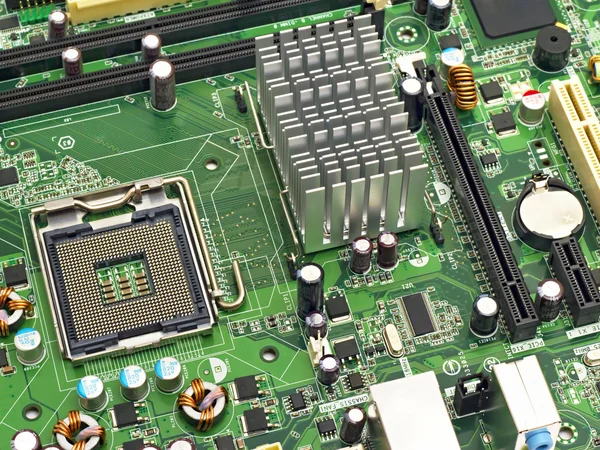
A motherboard is a type of computer hardware that acts as the main circuit board in a computer system. It is also called the mainboard, system board, or logic board. The motherboard serves as the central platform that connects and supports the different parts of a computer.

It is responsible for enabling communication between hardware components such as the CPU, RAM, storage devices, graphics card, and input/output devices. It also provides the electrical pathways and physical structure needed for these components to function together properly.

What are the types of motherboards?

The types of motherboards vary depending on form factor, socket compatibility, and intended application. Some of the most common types of motherboards are listed below:

  • ATX (Advanced Technology eXtended): ATX is the most common motherboard form factor used in desktop computers. It usually measures 12 x 9.6 inches and offers a standard layout with enough room for expansion slots, memory slots, and multiple connectors.
  • Micro-ATX: Micro-ATX is a smaller version of the ATX motherboard, typically measuring 9.6 x 9.6 inches. It is designed for more compact systems while still supporting a solid range of components and expansion options.
  • Mini-ITX: Mini-ITX is smaller than both ATX and Micro-ATX, usually measuring 6.7 x 6.7 inches. It is commonly used in compact PCs, home theater computers, and systems where space-saving design is important.
  • Extended ATX (E-ATX): E-ATX is a larger motherboard format than standard ATX, generally measuring 12 x 13 inches. It provides more expansion slots and additional room for high-performance hardware, making it popular for gaming systems and professional workstations.
  • Socket Types: Motherboards are also classified by socket type, which determines which processors they can support. Common socket types include LGA for Intel processors and AM4 or similar sockets for AMD processors.
  • Server Motherboards: Server motherboards are built for server environments and are designed to support heavier workloads. They often include features such as multiple CPU support, larger memory capacity, and expanded connectivity for enterprise use.
  • Workstation Motherboards: Workstation motherboards are intended for professional systems that require high performance and reliability. They usually support advanced graphics cards, larger storage configurations, and specialized hardware for demanding applications.

What are the components of a motherboard?

The components of a motherboard are listed below:

  • CPU Socket: This is the slot where the Central Processing Unit (CPU) is installed. It allows the processor to connect directly to the motherboard and communicate with the rest of the system.
  • RAM Slots: RAM slots hold the memory modules used for temporary data storage. These modules allow the CPU to quickly access the information needed for active tasks and running programs.
  • Expansion Slots: Expansion slots allow users to install additional hardware such as graphics cards, sound cards, and network cards. These slots make it possible to upgrade and customize the system.
  • Chipset: The chipset manages communication between the CPU, RAM, expansion slots, and peripheral devices. It plays a major role in coordinating data flow across the motherboard.
  • Power Connector: The power connector supplies electricity from the power supply unit to the motherboard. It ensures that the board and connected components receive the power needed to operate.
  • BIOS Chip: The BIOS chip contains firmware that helps start the computer during the boot process. It also provides low-level control over hardware settings and system initialization.
  • CMOS Battery: The CMOS battery powers the memory that stores BIOS settings when the computer is turned off. This allows system configurations such as date, time, and boot settings to be retained.
  • SATA Connectors: SATA connectors are used to connect storage devices such as hard drives and solid-state drives. They provide the interface needed for data transfer between the storage device and the motherboard.
  • USB Headers: USB headers allow front-panel or case-mounted USB ports to connect to the motherboard. They extend USB functionality beyond the rear I/O panel.
  • Front Panel Connectors: These connectors link the motherboard to the case’s power button, reset button, status lights, and front audio ports. They are essential for basic external case controls.
  • Ethernet Port: The Ethernet port provides a wired network connection. It allows the computer to connect to local networks or the internet through an Ethernet cable.
  • Audio Ports: Audio ports connect speakers, headphones, microphones, and other sound devices. They support the computer’s audio input and output functions.
  • Cooling Fans: Cooling fans help remove heat produced by the CPU and other components. They are important for maintaining safe operating temperatures inside the system.
  • Voltage Regulator Modules (VRMs): VRMs control and stabilize the voltage delivered to the CPU and other critical components. They help ensure efficient and reliable power distribution.
  • Heat Sinks: Heat sinks are metal components that absorb and disperse heat from parts such as the CPU and VRMs. They help prevent overheating and improve system stability.
  • Clock Generator: The clock generator produces timing signals that synchronize the operations of the motherboard’s components. This timing is essential for coordinated system performance.
  • Capacitors and Resistors: These small electronic components help regulate voltage, filter electrical noise, and stabilize current flow across the motherboard. They are vital for smooth and reliable operation.
  • Connectors and Headers: Various connectors and headers are included for attaching internal and external devices such as storage drives, USB ports, and front-panel accessories. They expand the board’s usability and connectivity.
  • BIOS Jumper: The BIOS jumper is used to reset BIOS settings to default values. It is commonly used for troubleshooting or recovering from incorrect firmware settings.
  • Diagnostic LEDs: Some motherboards include diagnostic LEDs that display the status of hardware during startup. These indicators can help identify problems with components during the boot process.

These are some of the main components found on a motherboard, although the exact layout and features may vary depending on the model, design, and intended use.

What is the function of a motherboard?

The function of a motherboard is to serve as the main circuit board of a computer, connecting and supporting all major hardware components. It provides the physical structure and electrical pathways that allow the CPU, memory, storage devices, expansion cards, and peripherals to work together.

The motherboard also plays a key role in communication and data transfer throughout the system. It houses important features such as the CPU socket, RAM slots, expansion slots, firmware chip, storage connectors, and external ports. By coordinating these elements, the motherboard helps ensure the computer operates smoothly, remains stable, and supports both basic and advanced computing tasks.

What is the history of motherboards?

The history of motherboards reflects the steady development of computer hardware over time. It began in 1981 when IBM introduced one of the earliest motherboard designs, known as the “planar,” which included a CPU and RAM on a single board. This early version also featured wired chips and ports for peripherals such as a keyboard, mouse, and cassette tape interface.

The idea of the motherboard developed from an earlier device called the backplane. A backplane was a printed circuit board that allowed different components to connect, but it did not include processing or storage functions. The motherboard improved on this design by integrating core components directly onto the board while also supporting additional peripherals and expansion devices.

During the 1980s and 1990s, motherboards advanced significantly in design and capability. Early boards mainly provided a CPU and expansion slots, requiring users to install separate memory modules and add-on cards for many functions. As computer technology improved, more features were built directly into the motherboard, making systems more practical, more compact, and more affordable.

By the late 1980s, Super I/O chips began appearing on motherboards, adding support for more input and output functions. Entering the 21st century, motherboards commonly included built-in support for video, audio, networking, and storage, reducing the need for separate expansion cards and making system assembly easier.

Intel also played an important role in motherboard development by introducing the BTX (Balanced Technology Extended) form factor in 2004. This specification offered updated design standards focused on improved airflow, thermal control, and internal layout. Variants such as microBTX and PicoBTX were later developed to support different system sizes and use cases.

Can old motherboards be disposed of by an ITAD service?

Yes, old motherboards can be disposed of by an IT Asset Disposition (ITAD) service. These providers specialize in the proper handling, recycling, and disposal of electronic equipment, including internal computer components such as motherboards.

ITAD services help ensure that old motherboards are processed in an environmentally responsible way and in accordance with applicable regulations. They may also recover reusable materials and components where possible. It is always a good idea to check with the specific ITAD (IT Asset Disposition) service provider for its exact procedures and disposal policies.

Is a motherboard a type of computer hardware?

Yes, a motherboard is a type of computer hardware. It is one of the most important parts of a computer hardware component system because it serves as the main circuit board that connects the system’s major parts and allows them to communicate.

The motherboard supports essential components such as the CPU, RAM, storage drives, and other internal devices needed for the computer to function. Without it, the different hardware parts would not have a common platform for communication, power distribution, and data transfer, making normal computer operation impossible.

Secure Data Center Decommissioning

Decommission your data center securely and sustainably with our streamlined equipment removal, complete data destruction, and environmentally responsible recycling services.
We are dedicated to providing customized service, environmentally sustainable practices, and secure ITAD. With free IT asset pickup and 30-day payment, we have been assisting companies across North America with the responsible retirement of IT assets since 2008. Learn Our Process

Our Clients