In your City, we only do pickups from Commercial Businesses.
Click here to lookup the nearest BestBuy.com location or Staples.com location for Easy Dropoff.
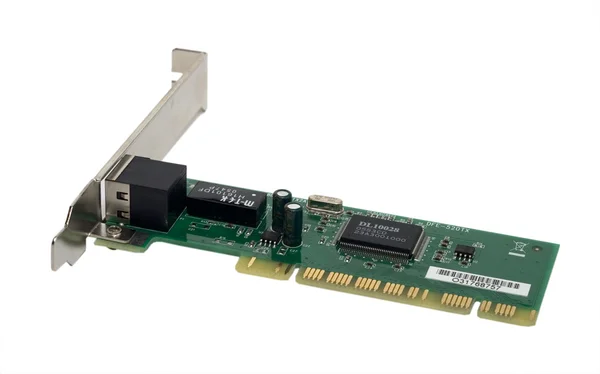
If you’ve ever wondered how your computer actually “talks” to the internet or to other devices on a network, the answer usually starts with a small but mighty piece of hardware called a Network Interface Card or NIC for short.
Also known as a network adapter or network card, a NIC is either built into your computer’s motherboard or installed as a separate component. Either way, it’s the hardware that gives your device the ability to send and receive data, whether that’s loading a webpage, sharing a file, or streaming video across a local network.
NICs work within the OSI model, operating primarily at the physical and data link layers. Every NIC comes with its own unique MAC address, which acts like a postal address for your device on the network, making sure data packets end up exactly where they’re supposed to go.
Not all NICs are built the same. The right type depends on how a device connects to a network.
Ethernet NICs are the most common in desktop computers and servers. They use a physical Ethernet cable and an RJ-45 port to deliver reliable, high-speed wired connections, often reaching speeds measured in gigabits per second.
Wireless NICs ditch the cables entirely. Instead, they use radio frequencies and antennas to connect to a Wi-Fi router or access point. You’ll find these in laptops, tablets, and most modern portable devices.
Fiber Optic NICs are built for speed and scale. Used mostly in data centers and high-performance computing environments, these cards support blazing-fast data transfer over fiber optic cables.
Expansion Card NICs plug directly into a motherboard slot, typically a PCI or PCIe slot and are common in desktop systems that need a dedicated or upgraded network connection.
USB Network Adapters offer a quick, plug-and-play solution. If a computer doesn’t have a built-in network port, a USB adapter can add that capability instantly without opening the machine.
A network interface card may look simple from the outside, but there’s a lot going on under the hood. Like many computer hardware devices, it is made up of several key components that work together to ensure reliable network connectivity.
The controller chip is essentially the brain of the card, it handles data processing, manages packet traffic, and ensures signals are transmitted correctly. The interface port is the physical connection point, whether that’s an Ethernet jack or a fiber optic connector.
The card itself is built on a circuit board that connects to the rest of the system through a bus interface, while a permanently assigned MAC address ensures the device can always be uniquely identified on the network. Many cards also include small LED indicators that let you see at a glance whether you have a live connection or active network traffic.
Yes, we handle them the right way.
As an IT Asset Disposition (ITAD) provider, Equip Recycling manages the responsible end-of-life processing of network interface cards and all kinds of computer hardware. NICs may seem like minor components, but they can hold firmware, configuration data, and identifiable MAC addresses, all of which need to be properly handled before the hardware leaves your hands.