In your City, we only do pickups from Commercial Businesses.
Click here to lookup the nearest BestBuy.com location or Staples.com location for Easy Dropoff.
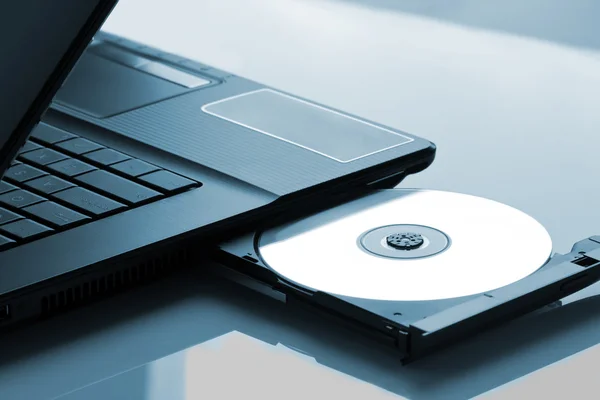
An optical drive is a type of computer hardware that reads and writes data on optical discs such as CDs, DVDs, and Blu-ray discs using laser or visible light technology. It is available as an internal component installed inside a computer or as an external device connected via USB. Inside the drive, a laser diode, lenses, and a motor work together to spin the disc and detect the microscopic pits and lands on its surface, converting the reflection pattern into readable data.
Most optical drives also write data onto blank discs, allowing users to create music CDs, video DVDs, or backup copies of important files. They have been widely used for distributing software, music, and movies, though their use has declined with the rise of digital distribution and cloud storage. Many modern computers and laptops no longer include built-in optical drives as demand for physical media has decreased.
Optical drives can still be useful for those with large collections of CDs, DVDs, or Blu-ray discs, and some specialized software or legacy systems may still rely on optical media for installation or data transfer.
The types of optical drives are CD drives, DVD drives, and Blu-ray drives.
These optical drives have different capabilities and are compatible with specific types of discs. CD drives can only read and write CDs, DVD drives can read and write CDs and DVDs, while Blu-ray drives can read and write CDs, DVDs, and Blu-ray discs. The choice of optical drive depends on the user’s needs and the type of media they intend to use.
Optical drives are components of computer hardware that provide the ability to read and write data on optical discs. They allow users to access types of media such as music, movies, software, and data files. While optical drives have become less common due to the rise of digital media and cloud storage, they still serve a purpose for those who prefer physical media or need to work with legacy systems.
The media formats of optical drives are listed below:
These 6 media formats offer different storage capacities and functionalities, allowing users to choose the most suitable format based on their needs. Optical drives enable the reading and writing of data to these optical media formats, providing a means of data storage, backup, and distribution.
To use a computer without an optical disc drive, there are several options available listed below:
The use of optical disc drives has declined due to the rise of digital media and cloud storage. They can still be useful for those who require access to physical media or have specific software requirements that rely on optical discs.
The history of optical drives starts in the late 1960s when James T. Russell invented the first optical disc. This early optical disc stored data as micron-wide dots of light and dark. The first optical drives for commercial use were developed in the late 1970s and early 1980s.
Inspired by the success of the compact disc (CD) format for music, the first optical drives used a red laser to read data from a spiral track on a disc. These drives could store up to 700 MB of data, providing higher capacity and faster access compared to floppy disks and magnetic tapes that were commonly used at the time.
In the late 1970s, companies like Philips and Sony separately developed prototypes in a race to create the first Compact Disc (CD). The CD format became the first widely available optical disc format, initially used for read-only purposes in the music industry.
Optical drives evolved to support both read and write capabilities and became popular for data storage, software installation, and multimedia playback. Optical drives offered portability, durability, and compatibility with a wide range of devices.
With the advancement of digital technology and the rise of online content distribution, the use of optical drives has declined. Computer manufacturers started phasing out built-in optical disc drives in the mid-2010s, opting for smaller form factors and relying more on digital distribution.
Optical drives still serve a purpose for those who require access to physical media or have specific software requirements. They remain useful for tasks such as installing legacy software, playing DVDs or Blu-ray discs, and archiving data on optical media.
The history of optical drives dates back to the late 1960s, with James T. Russell’s invention of the first optical disc. The development of optical drives in the late 1970s and early 1980s changed data storage and playback, offering higher capacity and faster access compared to previous storage technologies.
Yes, optical drives are often disposed of by ITAD (IT Asset Disposition) services. These services specialize in securely managing the disposal of electronic equipment, including optical drives. ITAD companies ensure that data is securely wiped from the drives before disposal to protect sensitive information. IT Asset Disposition companies follow environmentally friendly practices by recycling components of the drives that can be reused, reducing electronic waste.
Yes, an optical drive is a type of computer hardware. It is a device that uses laser light or electromagnetic waves to read or write data on optical discs such as CDs, DVDs, and Blu-ray discs. Optical drives are commonly found in desktop computers, laptops, and external drives. They provide a means for users to access and store data on optical media, making them a standard component of computer systems.