In your City, we only do pickups from Commercial Businesses.
Click here to lookup the nearest BestBuy.com location or Staples.com location for Easy Dropoff.
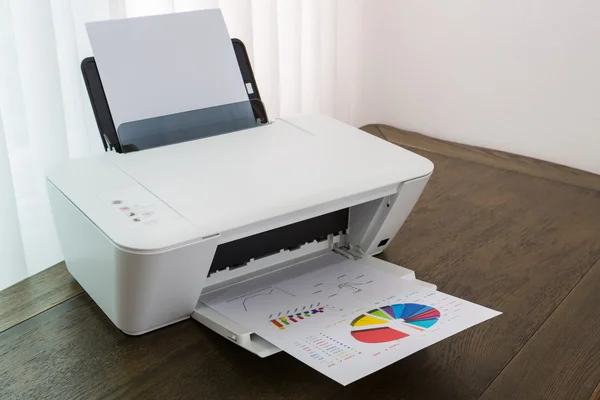
A printer is a type of computer and IT asset hardware that is an output device responsible for producing physical copies of text, graphics, or images on paper or other materials. Printers are essential components of computer systems, enabling users to create tangible representations of digital data. There are different types of printers available, including laser printers, inkjet printers, and dot matrix printers, each with its own technology and functionality.
Printers are vital for applications including document printing, image reproduction, and barcode printing. Knowing the types of printers and their uses helps users select the most suitable device based on their requirements and preferences. The evolution of printer technology has significantly improved the efficiency and quality of printed materials, adding to the functionality and productivity of computer systems.
The types of printers are listed below:
These different types of printers are used across homes, offices, and industries. Selecting the right printer depends on specific needs and requirements. Printers are physical components that work alongside computers to produce tangible outputs, making hardware components central to the functioning of a computer system.
Inkjet printers are a type of printer that use liquid ink to produce hard copies of text documents or images by propelling droplets of ink onto paper or other substrates. These printers are widely used for personal, home, and photo printing due to their ability to create high-quality, vibrant prints. Inkjet printers operate by propelling tiny droplets of ink onto paper through a print head. The print head moves back and forth as the paper feeds through the printer, ensuring precise and accurate ink deposition. A typical inkjet printer can produce color prints with a resolution of 1200 x 1440 dots per inch (dpi), resulting in clear, crisp text and brilliant color images. Inkjet printers can print on different types of paper, offering better tonal variety and color blending capabilities compared to laser printers. Inkjet printers use liquid ink stored in ink cartridges. In thermal inkjet printers, tiny resistors create heat to vaporize the ink and create a bubble, pushing the ink onto the paper. Inkjet printers are preferred for printing photos, images, and graphics due to their high-quality, vibrant output. They are commonly used in homes and for personal printing needs.
Laser printers are a type of printer that use electrophotographic technology to produce high-quality text, graphics, and images on paper. They work by using a laser beam to create an electrostatic image on a selenium-coated drum through electrical charges. This process involves the laser beam drawing the document on the drum, which is then transferred onto paper using toner in a dry, powdered form. One of the key advantages of laser printers is their speed and efficiency in handling large print jobs. They are known for high-speed printing capabilities, making them ideal for office environments where quick and high-volume printing is required. Laser printers typically have fewer maintenance requirements compared to inkjet printers, as toner cartridges last longer and do not dry out like liquid ink cartridges. Gary Starkweather is credited with inventing the laser printer in 1969 at the Xerox research lab in Webster, New York. Laser printers are associated with producing clear, crisp text and graphics suitable for business documents. They are also capable of producing moderate-quality photographs.
Dot matrix printers are a type of printer that use impact printing technology to create characters and images on paper. Unlike laser printers that use a laser beam or inkjet printers that use ink, dot matrix printers work by striking pins against an ink-soaked ribbon to form dots on the paper. These printers are known for their distinctive printing sound and are commonly used for printing multipart forms, invoices, receipts, and other documents that require multiple copies. Dot matrix printers produce carbon copies by pressing an inked ribbon against the paper, transferring the characters through a series of closely spaced dots. The print head contains a matrix of pins controlled electronically to form characters and images by impacting the ribbon against the paper. One key advantage of dot matrix printers is their ability to create multiple copies of a document at the same time, making them suitable for tasks that require duplicate copies. They are also known for their durability and reliability, making them a preferred choice for certain industrial and commercial applications. Dot matrix printers are generally slower than laser printers and inkjet printers, but they excel in tasks that require continuous and reliable printing, such as in environments where multipart forms are commonly used. Notable figures in the history of dot matrix printers include Centronics, which developed the Centronics printer interface that became a standard for connecting printers to computers. The Epson MX-80, introduced in 1980, was one of the most popular dot matrix printers of its time.
Thermal printers are a type of printer that use heat to produce images on paper. Unlike laser and inkjet printers that use toner or ink, thermal printers rely on heat-sensitive paper and thermal print heads to create text and images. These printers are commonly used in applications such as point-of-sale systems, labeling, fax machines, and some types of tickets. Thermal printers work by selectively heating coated thermal paper as it passes over the thermal print head. The heat causes the coating on the paper to react and produce the desired image or text. There are two main types of thermal printing technologies: direct thermal and thermal transfer printing.
In direct thermal printing, the print head generates heat directly on the thermal paper, causing the coating to darken and create the image. This method is commonly used for receipts, shipping labels, and other applications where the print needs to be temporary and cost-effective. Direct thermal printing does not require ink or toner cartridges, making it a simple and low-maintenance printing solution. Thermal transfer printing uses a ribbon coated with ink or wax-based pigment that is melted onto the paper when heated by the print head. This method is used for applications where more durable and long-lasting prints are required, such as barcode labels and product packaging. Thermal transfer printing produces high-quality prints that are resistant to fading and smudging.
Thermal printers offer fast printing speeds, quiet operation, and low maintenance requirements. They are known for their reliability and are commonly used in environments where high-volume printing is needed. The technology behind thermal printing has evolved over the years, with improvements in print quality and durability. Ichiro Endo is credited with inventing the first thermal printer in the 1970s. Thermal printers have since been adopted across retail, healthcare, transportation, and logistics due to their efficiency and cost-effectiveness.
Solid ink printers are a type of printer that use solid wax-based ink sticks or blocks instead of traditional liquid ink cartridges. These printers were introduced in the late 1980s and are known for their unique printing process. When a print job is initiated, the solid ink sticks are heated to their melting point within the printer. This transforms the solid ink into a liquid form, which is then transferred onto the paper to create the desired image or text. One key feature of solid ink technology is its use of wax-based ink, a waxy, resin-based polymer that needs to be melted before printing. This method differs from conventional liquid inks found in inkjet printers. Solid ink remains solid at normal ambient temperatures but is melted within the printer to become a liquid for printing.
Solid ink printers work by liquefying the wax ink sticks into reservoirs within the printer. The ink is then sprayed onto the paper in a phase-change process, where it solidifies upon contact and produces vibrant, high-quality prints. These printers are often praised for their color accuracy and are well-suited for printing full-color images. Xerox is a notable company associated with the development and patenting of solid wax ink technology. Genuine Xerox solid ink sticks are specially formulated for specific printer models to ensure optimal print quality and consistency. These ink sticks are designed to minimize packaging waste, making solid ink printers a more environmentally friendly option compared to inkjet and laser printers.
Continuous ink printers are a type of printer that use a continuous ink supply system to generate a steady stream of ink droplets for printing. These printers, also known as CISS printers or continuous inkjet printers, are designed to provide a cost-effective solution for high-volume printing needs. The technology involves a continuous flow of ink from an ink reservoir through a nozzle, creating a jet of ink used for printing on various surfaces. This process allows for the continuous printing of small but high-quality prints, including text, barcodes, and images.
One key feature of continuous ink printers is their use of refillable ink tanks or reservoirs instead of traditional cartridges. This design allows for a higher printing capacity and reduces the need for frequent cartridge replacements. Manufacturers like HP and Canon have introduced printers with built-in, refillable ink tanks that use high-yield ink bottles, providing users with a more cost-effective and environmentally friendly printing solution. Continuous ink printers are commonly used in industrial settings for marking and coding products with variable information such as dates or batch codes. The printers offer non-contact printing flexibility, allowing them to mark on surfaces including rough or uneven materials. Brands like Videojet and Hitachi offer CIJ printers suited for different line speeds and production requirements.
Continuous inkjet technology has been in use since the early 1950s and has become a reliable option for businesses with high printing demands. The continuous ink supply system ensures a steady flow of ink, making these printers ideal for producing consistent and high-quality prints. With the ability to produce thousands of pages from a single ink refill, continuous ink printers offer a cost-effective solution compared to traditional cartridge-based printers.
LED printers are a type of printer that use light-emitting diodes (LEDs) to create an image on the printing surface. Unlike traditional laser printers that use a laser beam to create the image on a drum, LED printers use an array of LEDs to achieve the same result. These printers are known for their reliability, efficiency, and high-quality output. LED technology allows for precise control over the printing process, resulting in sharp text and graphics.
One advantage of LED printers is their simpler design. LED printers have fewer moving parts compared to traditional laser printers, which reduces maintenance requirements and increases durability. The absence of a moving laser beam also contributes to faster print speeds, making them useful for high-volume printing environments. LED printers are also more energy efficient, consuming less power compared to traditional laser printers. They also tend to be more compact and quieter in operation, making them suitable for small office spaces or home use.
LED printers are capable of producing high-resolution prints with crisp text and vibrant colors. LED technology allows for precise control over toner placement, resulting in consistent and accurate output. These printers are suitable for a wide range of printing tasks, from text documents to graphics and images. Notable manufacturers of LED printers include OKI, Xerox, and Dell. LED printers have gained traction for their reliability, speed, and cost-effectiveness, making them a competitive alternative to traditional laser printers.
A3 printers are a type of printer designed to handle larger paper sizes, notably A3 (297 mm x 420 mm or 11.69 x 16.53 inches) and other sizes such as A4, US Letter, Legal, Tabloid/Ledger, envelopes, and postcards. These printers can accommodate paper sizes up to 11 x 17 inches or even 12 x 18 inches with the use of a bypass tray. They are known for their flexibility in printing different paper dimensions, making them suitable for a wide range of printing needs.
Compared to A4 printers, A3 printers are larger and often more robust, making them ideal for high-volume printing and specialized finishing requirements. A3 printers are commonly used in environments where larger prints are needed and where detailed presentations or striking graphics are required. They are favored for their ability to handle a range of paper sizes efficiently, offering increased productivity, improved efficiency, and cost savings for businesses.
A3 printers are available in different models, including copiers, printers, and multifunction printers (MFPs), which can print, scan, copy, and fax documents up to 11 x 17 inches. These printers are equipped with advanced features for ease of use and are adaptable to different printing needs beyond just larger prints. A3 printers are typically more expensive than A4 printers due to their larger size and enhanced capabilities. However, they deliver vivid graphics and high-quality output at larger sizes, going beyond the capabilities of A4 printers. Some popular A3 printer models include the HP OfficeJet Pro 9730e Wide-format Printer and the HP Color LaserJet Enterprise MFP, known for their high-volume printing capabilities and advanced features.
The features to look for in a printer are:
These features directly impact a printer’s performance, cost-effectiveness, and suitability for specific printing needs. Knowing these features helps users make an informed decision when investing in a printer, which is an important IT asset for both personal and professional use.
The history of printers starts as early as 3000 BCE when the proto-Elamite and Sumerian civilizations used cylinder seals to certify documents written in cuneiform script. Over time, printing technology evolved significantly. In 1041, Chinese printers adapted wood-block printing to mass-produce classical books. This was followed by the invention of movable type made from baked clay in China in 1151, a significant advancement in printing technology.
In the mid-1400s, German craftsman Johannes Gutenberg developed a way to handle movable type more efficiently, leading to the invention of the printing press. This invention changed the production of printed materials and marked the beginning of the Printing Revolution. Gutenberg’s printing press allowed for the mass production of printed matter, making books more accessible and affordable.
In 1907, Englishman Samuel Simon was awarded a patent for using silk fabric as a printing screen, which popularized screen printing. The 1930s saw the invention of the dry printing process by Chester Carlson, which later became known as electrophotography or Xerography, changing the printing industry.
The 1950s brought further advancements with Remington-Rand developing the world’s first high-speed printer in 1953, followed by IBM’s printer developments in 1957. The 1970s saw the introduction of the first laser printers by IBM and Xerox, with HP’s LaserJet in 1984 marking the beginning of desktop publishing.
The history of inkjet printers is shared among Canon, Hewlett-Packard, and Epson, with the idea dating back to the 1950s. Inkjet printing technology has continued to evolve, offering high-quality prints at affordable prices.
The history of printers reflects a long path of technological progress, from ancient printing methods to modern high-speed laser and inkjet printers.
Yes, ITAD (IT Asset Disposition) companies dispose of printers as part of their services. They specialize in the proper disposal and recycling of IT equipment, including printers. Information Technology Asset Disposition companies ensure that printers are recycled or disposed of in an environmentally friendly and secure manner, in compliance with regulations.
Yes, printers are a type of computer hardware. Printers are peripheral computer hardware devices connected to computers to produce physical copies of documents or images. They rely on computer commands to function and are an essential component of a computer setup.