In your City, we only do pickups from Commercial Businesses.
Click here to lookup the nearest BestBuy.com location or Staples.com location for Easy Dropoff.
Computer hardware is a type of IT asset that refers to the physical and tangible components of a computer system. It encompasses all the physical devices and equipment that enable a computer to function and perform various tasks. These components include the central processing unit (CPU), random access memory (RAM), motherboard, storage devices, input devices (such as keyboards and mice), output devices (such as monitors and printers), and other related devices.
Computer hardware is essential for the operation and functionality of a computer system. It provides the necessary infrastructure for running software and executing instructions. Without hardware, software alone cannot perform any tasks. Hardware components work together to process data, store information, display output, and facilitate communication.
The importance of computer hardware lies in its role as the foundation of an organization’s IT infrastructure. It enables businesses to perform functions such as data processing, storage, networking, and communication. Upgrading or optimizing hardware can lead to improved performance, increased efficiency, and enhanced capabilities for organizations. Advancements in hardware technology have driven innovation and the development of more powerful and efficient computing systems.
Computer hardware has evolved over time, with advancements in technology leading to smaller, faster, and more efficient components. Inventors and important figures in the field of computer hardware include pioneers like Charles Babbage, who conceptualized the idea of a programmable computer, and Alan Turing, who laid the foundation for modern computing.
The components of a computer are listed below:
A CPU is a type of internal computer hardware that is the primary component responsible for executing instructions and performing calculations within a computer system. It is often referred to as the “brain” of the computer. The CPU, short for Central Processing Unit, controls the interpretation and execution of instructions from programs, transforming data input into meaningful information output.
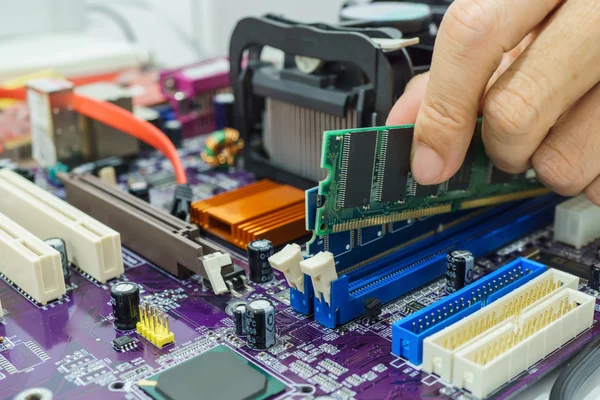
A motherboard is a type of internal computer hardware that is the main printed circuit board (PCB) within a computer system. It acts as the central hub that connects and facilitates communication between internal components and external peripherals. The motherboard provides the foundation for all other hardware components to interact effectively.
RAM is a type of internal computer hardware that stands for Random Access Memory. It is the short-term memory where data the processor is currently using is stored. RAM allows the computer to access data much faster than long-term storage devices like hard disks or SSDs, which has a direct impact on system performance.
A hard drive is a type of internal computer hardware used for data storage in laptops and desktop computers. It is a non-volatile storage device, meaning it retains data even when power is not supplied. The hard drive stores data including the operating system, applications, user files, documents, pictures, music, videos, and program preferences.
A solid-state drive (SSD) is a type of internal computer hardware that is a storage device using flash-based memory technology, typically NAND flash memory. Unlike traditional hard disk drives (HDDs) that rely on spinning disks, SSDs have no moving parts, which results in faster data access speeds, improved durability, and reduced power consumption. SSDs provide persistent data storage by keeping information on solid-state flash memory chips.
A graphics processing unit (GPU) is a type of internal computer hardware designed to handle and accelerate the rendering of graphics and images on a screen. Originally developed to enhance computer graphics and image processing, GPUs have evolved to become key components in applications well beyond graphics rendering.
A network interface card (NIC) is a type of internal computer hardware that enables a computer to connect to a network. It is also known as a network adapter, LAN adapter, or network interface controller. The NIC takes the form of a circuit board or chip installed within a computer system, facilitating communication between the computer and other devices on a network.
An optical drive is a type of internal computer hardware that allows users to read from and write data to optical discs such as CDs, DVDs, and Blu-ray discs using laser technology. This component uses a laser diode to read data stored on optical discs by distinguishing between pits and lands on the disc’s surface based on how light reflects. Optical drives can be internal, installed inside the computer, or external, connected via USB or other interfaces.
A heat sink is a type of internal computer hardware that is a passive heat exchanger designed to dissipate heat generated by electronic or mechanical devices such as a CPU. It is typically made of a thermally conductive material, often metal, and keeps operating temperatures within safe limits for electronic components.
A monitor is a type of external computer hardware that is an output device displaying visual information such as images, text, video, and graphics generated by the connected computer system through the video card. It is also known as a video display terminal (VDT) or a video display unit (VDU).
A keyboard is a type of external computer hardware that is an input device allowing users to enter text, characters, numbers, and commands into a computer or electronic device. It consists of an arrangement of buttons or keys that act as mechanical levers, enabling users to interact with the system. The primary function of a keyboard is to transmit data to the computer system by pressing these keys.
A mouse is a type of external computer hardware input device used to interact with a computer system by controlling the movement of the cursor on the screen. It is a hand-held pointing device that detects two-dimensional motion relative to a surface, typically a desk. The mouse allows users to navigate graphical user interfaces (GUIs), select items, click on icons, drag and drop files, and perform other actions by moving the device across a flat surface.
A speaker is a type of external computer hardware that is an electroacoustic transducer, converting electrical audio signals into sound waves. It is an output device that allows users to hear audio from computers, smartphones, and other electronic devices. Speakers work by converting electrical energy into mechanical energy, causing vibrations in the air that produce sound waves.
Headphones, earphones, and earbuds are a type of external computer hardware used for audio output and communication purposes.
A microphone is a type of external computer hardware that is an input device converting sound waves into electrical signals. This transducer device captures audio and transmits it to devices for processing and recording. The microphone is a standard tool for communication, recording, and amplification in settings from live performances to digital recordings.
A camera is a type of external computer hardware that is an optical instrument designed to capture and store images or videos. It operates by capturing light and processing it into an image through a lens that focuses light onto a light-sensitive surface. The camera consists of a lightproof chamber with an aperture fitted with a lens and a shutter through which the image of an object is recorded.
A touchpad is a type of external computer hardware that is an input device commonly found on laptops, netbooks, and other portable devices. Also known as a trackpad, it provides users with a flat, touch-sensitive surface for controlling the cursor and performing functions without a traditional mouse. The touchpad typically replaces the mouse on laptops and netbooks, giving users a built-in way to interact with their devices.
A USB flash drive is a type of external computer hardware that is a portable storage device utilizing flash memory technology and an integrated USB interface. These devices go by names such as USB stick, USB thumb drive, pen drive, jump drive, or data stick. They are plug-and-play devices, allowing users to connect them to a computer’s USB port for data storage, backup, and file transfer.
A memory card is a type of external computer hardware that uses flash memory technology to store digital data. Flash memory is a non-volatile storage medium that retains information even when power is turned off. Memory cards are commonly used in digital cameras, smartphones, drones, and other electronic gadgets to provide additional storage for photos, videos, documents, and other digital content.
A joystick is a type of external computer hardware input device used to control the movement or actions of a digital object on a computer screen. It consists of a handle or stick that pivots on a base and reports its angle or direction to the device it is controlling. Joysticks are used in applications including video games, medical devices, industrial equipment, and flight simulators.
A stylus is a type of external computer hardware that is a pen-like instrument used for interacting with touchscreens on smartphones and tablets. It gives users a more precise and comfortable way to write, draw, navigate, and input commands on touch-sensitive devices. The stylus features a fine tip that allows for accurate input and mimics the functions of a pen or pencil on a screen.
A scanner is a type of external computer hardware input device that optically scans images, printed text, handwriting, or objects and converts them into a digital format that can be viewed, edited, or stored on a computer. Scanners use light-sensitive components and lenses to capture images and convert them into digital signals. This process allows physical documents or objects to be digitized and stored electronically.
A printer is a type of external computer hardware output device that accepts text and graphic output from a computer and transfers the information to paper or other materials. Printers generate hard copies of digital documents, images, or text files. They are standard components in homes, offices, educational institutions, and businesses.
The difference between hardware and software is that hardware encompasses the physical components of a computer system, such as the CPU, memory, hard drive, and peripherals like monitors and keyboards. These components are tangible and essential for the computer to operate. Software, on the other hand, refers to the intangible programs, applications, and data that run on the hardware. Software includes operating systems, word processors, web browsers, and applications that provide instructions for the hardware to execute tasks. Hardware provides the physical infrastructure, while software controls and coordinates these components to perform specific functions and tasks.
Hardware virtualization is a technology that allows multiple virtual machines (VMs) to run on a single physical machine or server. It enables the creation of isolated environments, each with its own operating system and applications, on the same hardware. This is achieved by using a hypervisor, which is a software layer that manages and allocates the physical resources of the host machine to the virtual machines. Hardware virtualization provides better resource utilization, improved security, and flexibility in managing and scaling computing resources.
Hardware as a Service (HaaS) is a business model where companies lease or rent physical IT equipment, such as servers, storage devices, networking hardware, or other infrastructure components, instead of purchasing them outright. This model allows organizations to access and use hardware resources without large upfront investments. HaaS providers manage the maintenance, upgrades, and support of the hardware, offering a more flexible and cost-effective solution for businesses.
Yes, you can dispose of your old computer with an ITAD (IT Asset Disposition) service. ITAD services specialize in securely managing the disposal of IT assets like computers, ensuring data destruction and environmentally friendly recycling. They follow industry standards to wipe data securely and responsibly recycle electronic components. By using an ITAD service, you can ensure that your old computer is disposed of in a safe, secure, and environmentally conscious manner.