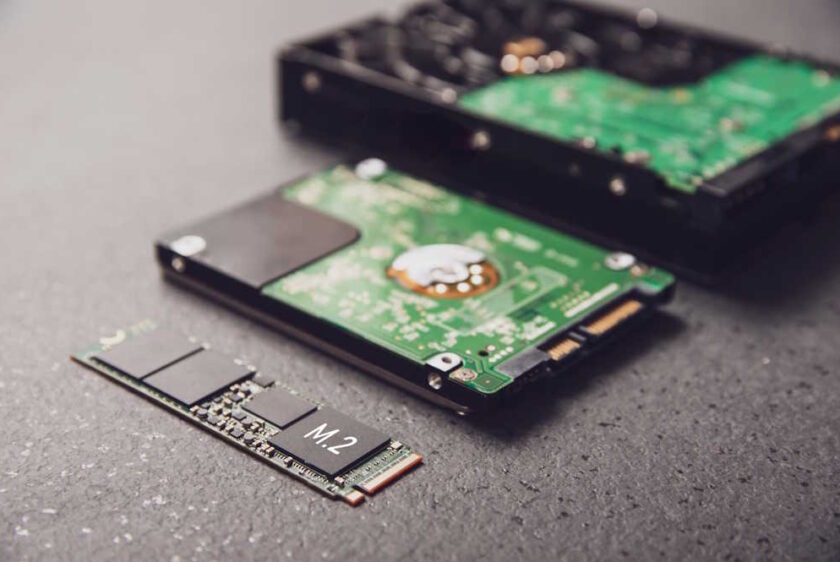
Data storage refers to the use of magnetic, optical, electronic, or mechanical media to capture and safeguard digital information for later retrieval. Of the many storage options available today, the two most common are the hard disk drive (HDD) and the solid-state drive (SSD). HDDs work by spinning magnetic platters that are read and written to by a moving head, while SSDs rely on flash memory chips without moving components.
Because of this technological difference, SSDs deliver faster speeds, higher durability, and lower power consumption, although they cost more per gigabyte. HDDs, by contrast, remain a go-to choice for bulk storage thanks to their larger capacities and lower price. Together, SSDs and HDDs form the backbone of modern computing, with each catering to different needs based on whether speed, cost, or storage volume is the priority.
In your City, we only do pickups from Commercial Businesses.
Click here to lookup the nearest BestBuy.com location or Staples.com location for Easy Dropoff.
Data can be stored in a wide range of media, including SSDs (Solid State Drives), HDDs (Hard Disk Drives), USB flash drives, SD and microSD cards, CDs and DVDs, cloud services, external hard drives, NAS (Network Attached Storage), SAN (Storage Area Networks), hybrid drives (SSHDs), tape storage, and enterprise-level formats such as object, block, and file storage. Each solution is designed for specific trade-offs in terms of speed, capacity, cost, and environment.
Solid State Drives (SSD) are advanced storage devices that use NAND flash chips rather than mechanical parts, making them significantly quicker and more resilient than HDDs. They are non-volatile, meaning information stays preserved even if power is lost. SATA SSDs usually reach speeds of 500–550 MB/s, while NVMe models can soar up to 7,000 MB/s. Their key strength is speed, which dramatically reduces boot times and boosts system performance. Costs average $0.08–$0.15 per gigabyte, with a 1 TB SSD generally priced between $80 and $120. SSD are now standard in laptops, desktops, gaming PCs, and enterprise-grade servers.
Hard Disk Drives (HDDs) store information on magnetic platters accessed by a moving actuator arm. Like SSDs, they provide non-volatile storage, but performance is slower, averaging between 80–160 MB/s depending on whether the drive spins at 5,400 or 7,200 RPM. The biggest advantages of HDDs are affordability and space, with costs averaging $0.03–$0.05 per gigabyte. A typical 2 TB HDD sells for around $60–80. They remain widely used in desktops, servers, and external drives where sheer capacity is more important than speed.
USB flash drives are compact plug-and-play storage devices that use NAND flash memory and connect via USB ports. They are portable, rewritable, and non-volatile, making them convenient for fast file transfers. Speeds range from about 30 MB/s on older USB 2.0 models to 400 MB/s or higher on USB 3.2 devices. Their biggest strength is portability. A 64 GB drive usually costs $5–20, while 256 GB models run $30–60. They are commonly used by students, office workers, and professionals who need quick and mobile file storage.
SD and microSD cards are miniature flash storage devices frequently used in cameras, drones, smartphones, and handheld consoles. They provide non-volatile storage with performance varying by class: standard cards offer 30–90 MB/s, while UHS-II and UHS-III versions can reach up to 300 MB/s. Their advantages include compact size and easy removal. A 128 GB card typically costs $10–20, while 512 GB cards cost $30–50. They remain essential in photography gear and portable electronics.
CDs and DVDs are forms of optical storage that use lasers to read and write data. They remain valid storage because they retain information even without power. A CD holds up to 700 MB, while DVDs can store 4.7 GB (single layer) or 8.5 GB (dual layer), with speeds ranging between 1–10 MB/s. Their strengths are low price and durability, though they are now largely outdated. Blank discs cost less than $1 and are still used in schools, offices, and for archival purposes.
Cloud storage refers to digital data hosted on remote servers and accessed online. Files are stored permanently in distributed data centers, with transfer speeds depending on internet bandwidth (commonly 20–500 MB/s). Its primary benefits are accessibility from any location and automated backups. Costs follow subscription models, such as $10 per month for 2 TB with Google Drive or Dropbox. Cloud storage is now a standard tool for individuals, enterprises, and organizations needing collaboration and data redundancy.
External hard drives are self-contained HDDs or SSDs enclosed in protective casings and connected via USB or Thunderbolt. They deliver the same functionality as internal drives but with added portability. HDD-based models average 80–160 MB/s, while SSD externals achieve 500–1,000 MB/s. Their value lies in large storage at reasonable cost, usually $60–80 for a 2 TB HDD or $100–150 for a 1 TB SSD. These drives are widely used for data backups, personal media storage, and carrying files between systems.
Network Attached Storage (NAS) devices are systems that connect directly to a local network, enabling shared file access across multiple devices and users. They house HDDs or SSDs and typically deliver speeds of 100–250 MB/s over Gigabit Ethernet, with faster connections possible. Advantages include centralized storage, redundancy, and remote access. A basic NAS unit starts at $300–500 (without drives), with additional costs of around $100 per terabyte. NAS solutions are popular among home offices, small businesses, and creative teams.
Storage Area Networks (SAN) are enterprise-grade architectures that link servers to centralized pools of block-level storage. They are a type of storage because they provide scalable, high-performance data access. Transfer speeds can exceed 10–25 Gb/s depending on fiber channel or iSCSI connections. Their main benefits are scalability and reliability for mission-critical workloads. SAN implementations are costly, often reaching tens of thousands of dollars, and are most common in data centers, banks, and large corporations.
Hybrid drives (SSHDs) merge traditional HDD platters with a small flash memory cache. Bulk data resides on the spinning disks, while frequently accessed files are stored in solid-state memory for quicker access. Average speeds remain 80–160 MB/s for the magnetic portion, but the cache reduces delays for common tasks. Their value lies in balancing capacity with better responsiveness at a modest cost. A 1 TB SSHD typically costs $70–90. They are often used in desktops and laptops where affordability and speed need to coexist.
Tape drives are magnetic storage technologies that use reels of tape to archive massive volumes of data sequentially. They qualify as storage because they preserve information for decades. Typical throughput is 300–400 MB/s sustained. Their advantage is unmatched cost-efficiency, with capacities reaching 20 TB per tape at about $100 per cartridge, equating to very low cost per gigabyte. Tape is still widely deployed in enterprises and data centers for backup and archival.
Object storage organizes data into objects that include the file itself, metadata, and an identifier. It is commonly used in enterprise and cloud environments and excels at managing unstructured data at scale. Performance depends on infrastructure but often reaches 200 MB/s or more. Its main strength is scalability into petabytes, with subscription pricing around $20–25 per TB per month. Object storage underpins cloud platforms, analytics, and large media libraries.
Block storage breaks data into fixed-size blocks controlled by the operating system. It is widely used in SANs and enterprise systems for workloads requiring maximum performance. Speeds can exceed 5,000–10,000 IOPS, depending on hardware. Benefits include flexibility and high throughput, making it ideal for databases and transactional systems. Costs run higher than file-based storage, averaging $0.10–$0.20 per gigabyte. Block storage is crucial for mission-critical enterprise applications.
File storage is the traditional model where data is arranged in files and folders. It remains relevant because it provides a simple, human-friendly hierarchy. Performance depends on the storage medium underneath (HDD, SSD, or NAS). Its key advantage is ease of use and compatibility. Pricing is aligned with the underlying drive type. File storage continues to dominate personal computers, office environments, and shared servers.
The evolution of data storage spans nearly 200 years, progressing from mechanical punched cards to today’s cloud-powered infrastructure. Each stage reflected the demand for higher capacity, quicker access, and easier distribution.